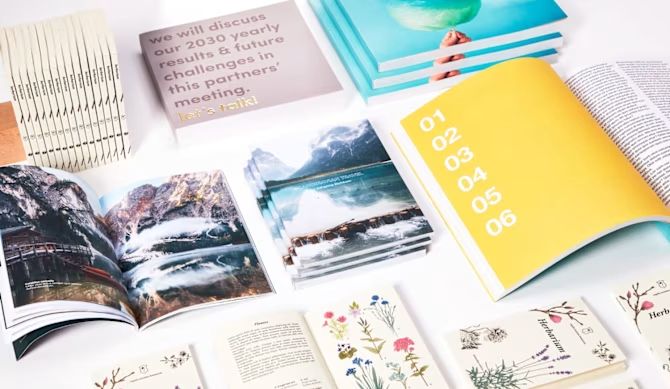
Wire-o Binding

Choose our Wire-o Binding for a practical yet stylish publication! This binding option is perfect for showcasing your content in a professional way while ensuring easy use.

The spiral bound allows documents to lay completely open and flat, with no need to hold them, and also enables pages to rotate 360 degrees, for quick and effortless browsing. As a result, wire-o binding is widely used for manuals, catalogues, reports, recipe books and textbooks.

But it doesn’t stop there —with your creative vision and our fully customisable options, wire-o binding can be whatever you need it to be: personalise format, spiral position, number of pages and paper to print your company profile, a menu or portfolio in any language you need and make your business talk out loud. Use the wire-o binding as a notebook, a guestbook or to create your own sketchbook to be filled with notes, colours and memories. Moreover, make your spiral become a calendar or a planner.

Trust us, wire-o is the product that will successfully bind together your ideas!

WE HELP YOU CHOOSE THE RIGHT PRODUCT!
  • Closed format: first select the closed format of your publication. Choose between standard formats or customise it as you prefer: from 10.5x14.8 cm to 45x42 cm, create your fully personalised wire-o binding and stand out with a non-conventional size: surprise your readers with a squared or a stretched format
 
  • Orientation: figure your printed book closed and then select vertical or horizontal layout. If your publication is in a right-to-left script (like in RTL languages), make sure to design your graphics with the content flowing from the end to the beginning
 
  • Spiral position: select the left bound option if you want your product to be read as a traditional book (turning pages from right to left). If you want the spiral on the top side instead, choose the “double pages in reading order” option if you’re planning to read the document fully opened, two pages at a time; while select the “single pages in reading order” option to read only one page at a time. Use the pictures provided (under the “i” icon and download the instructions document on the product page) to better understand which option fits your need. Be careful when selecting the desired spiral position and reading option and then upload your file in reading order: we’ll automatically adjust the layout according to your selection
 
  • Number of pages: insert the total number of pages (it must be minimum 8 and a multiple of 2) including the cover (4 pages). Example: if you have 38 inside pages, the total number of pages must be 42, as the cover always counts as 4 (if you don’t want to print the inside cover, white pages still count)
  • In case of front only printing, the total number of pages to be inserted only includes printed pages (it can therefore also be an odd number) and the cover is made of 2 printed pages. Example: if you have a 13 pages file for the inside, the total number must be 15. All the backs will automatically be blank (no need to insert them in the uploaded file) and the last page of your file will be the back cover

We recommend downloading instructions and template on the product page to create a print-ready file.

 
  • Paper: choose from a wide range of grammages with our standard and premium papers

You have the flexibility to print your cover and inside pages on different paper types and weights, or keep them consistent with the same paper and grammage throughout. However, the cover is frequently printed on a higher grammage and is laminated. Adding lamination to coated paper is recommended to protect the print from scratches and liquids.

Furthermore, lamination adds a touch of elegance to your publication, enhancing colours and providing a polished effect


If you’re looking to stand out with a very special cover effect, add special finish to the external cover of your spiral binding: give your book a unique look!

Please note that special finish option is only available on the cover and coated papers.

Alternatively, you can achieve a sophisticated look by choosing textured or special effect papers and mixing different materials to suit your style.     


Remember to use only non-coated and smooth papers in case you need to take notes on your printed product. For a deep dive into our papers’ world check this article.

If you’re looking for a more traditional binding and want your publication to look exactly like a book, you should consider our perfect binding or sewn binding for a premium and elegant edition. Stapled binding could instead be a valid alternative for brief content or if you want your booklet to look more like a magazine.

 
FIND OUT MORE
  • Click on the the "i" icon for detailed descriptions of the papers (with pictures)
  • Looking to get a printed proof before ordering your wire-o binding? Order one copy and get a promocode for the value of your spend to purchase the same product! Find here more details 

  • In case you want to print a bespoke calendar, be careful to choose first the “top wire-o bound – single pages in reading order” option, and then “spiral calendar” under the binding selection. In this way, you can create your own wall calendar with the format, number of pages and paper type you prefer. Otherwise, you can find our standard wall calendars here
  • If you want to bind your publication on your own and just print the pages with us, instead, this product can serve the purpose
  • Take a look at our spiral notebooks for your meetings, training sessions, or client gifts. These wire-o binding notebooks are the perfect choice to leave a mark. Print your graphics on the cover and customise the inside pages design (repeated on all the internal pages): allow your audience to use them in their daily lives
  • With Magazoo, your creations find a home in a sturdy, fully customisable honeycomb cardboard magazine rack shaped like an animal. Choose your favourite among a cat, dog, sheep, pig or elephant to set up your stand or point of sale, and enjoy customising your design with Designer. You can choose from a wide range of backgrounds and images that will help you create your creative project in just a few clicks!
  • Thanks to the design upload and preview service, you can upload your file in just a few seconds and get a print-ready result without any worries. We automatically check your file and fix minor issues for you, while also allowing you to make some adjustments directly online, so you can proceed with printing your wire-o binding in complete peace of mind. For more information, we recommend reading this article
WHERE/WHEN CAN YOU USE IT
Where
  • Public and private offices
  • Stores
  • Museums
  • Bar and restaurants
  • Schools, sports and cultural associations
When
  • Product or service presentations
  • Trade fair
  • Company events
  • Wedding
  • Party - Gift exchanging
BOOKS & MAGAZINES (marked with the Image1.png ) ARE USUALLY COMBINED WITH...
mockup-PIX-desk_final_Books.png

1. Flyers & Folded Flyers

2. Stationery 

3. Business cards

4. Calendars & Diaries

5. Invitation cards

6. Labels & Stickers

7. Displays

8. Signage

9. Posters

10. Promotional items 

FAQ
  • Can I personalise the spiral dimensions?

It is not possible to choose the spiral dimension (diameter). It is automatically provided according to the spine dimension of the printed product. You can choose whether to have it black or silver.

  • Where will the holes for the spiral be placed?

The holes (4 mm diameter) will be drilled on the side you’ve chosen for the spiral position. To prevent texts from being too close to the edge and hard to read, we highly recommend using the template that matches your selected product configuration. It ensures accurate margin dimensions, which can vary depending on factors like the number of pages and the paper thickness.

  • Will my booklet open flat?

The book will perfectly open flat and lay down open, with no need to touch it or hold it. Moreover, you can rotate pages 360 degrees and still have it totally flat.

  • Is it possible to add tabs or dividers within a wire-o-binding?

No, it’s not possible to add pages of different dimensions or dividers to the product.

  • Are your wire-o binding publications offset or digital printing?

We rely on different printing methods (digital or offset) and therefore different printing machines depending on the quantity, the chosen paper type and many other variables. Nonetheless, we guarantee both methods allow high print quality.

  • How can I create my design?

At the moment, Designer is not available for this product. We provide detailed. We provide instructions and template to create a print ready file on your own (with a design software) on the product page.

If you need any help editing or creating your booklet, have a look at our Design Services. Please note that for this product the design service needs to be purchased on the product page directly and the service quote will automatically be displayed once you have filled in the product features.

Was this article helpful?
1 out of 2 found this helpful